
How to Set Leverage on WEEX: A 2026 Step-by-Step Guide


Leverage lets you control a bigger position than the money you actually put in. On WEEX, leverage goes up to 10x for all clients – retail and professional alike. With 100margin,you can open a 100 margin,you can open a 1,000 position. That's 10x leverage. The setting works the same no matter how you got classified.
Leverage is one of the most important settings to understand before you trade. It decides your market exposure, how fast gains and losses add up, and how close your liquidation price sits to your entry. Getting leverage right isn't about maxing it out. It's about matching it to the move you expect and the loss you can take if you're wrong.
How Leverage Works
Leverage lets you control a bigger position than the money you put in.
Example: You have 100.With10xleverage,youcontrola100.With10xleverage,youcontrola1,000 position. If the price moves 1% in your favor, you gain 10(1010(10100). If it moves 1% against you, you lose $10.
That sounds great until it goes against you. A 10% move against a 10x position wipes out your entire $100.
Leverage also determines your liquidation price. Higher leverage = liquidation price closer to current price. Always check that number before clicking buy or sell.
How to Set Leverage on WEEX
Setting leverage on WEEX is straightforward. You do it in the order panel before placing a trade.
Step-by-step Guide:
1. Open the WEEX trading interface and navigate to the perps or margin section.
2. Choose your margin mode – Isolated or Cross.
3. Find the leverage selector. It shows as a multiplier (e.g., 10x).
4. Click the leverage value. A slider or input field pops up.
5. Adjust to your chosen level. WEEX offers up to 400x leverage on some trading pairs.
6. Watch the estimated liquidation price update automatically. If it's uncomfortably close to current price, lower your leverage.
7. Place your order.
Key point: Leverage is set per order, not per account. You can use 2x on one position and 10x on another.
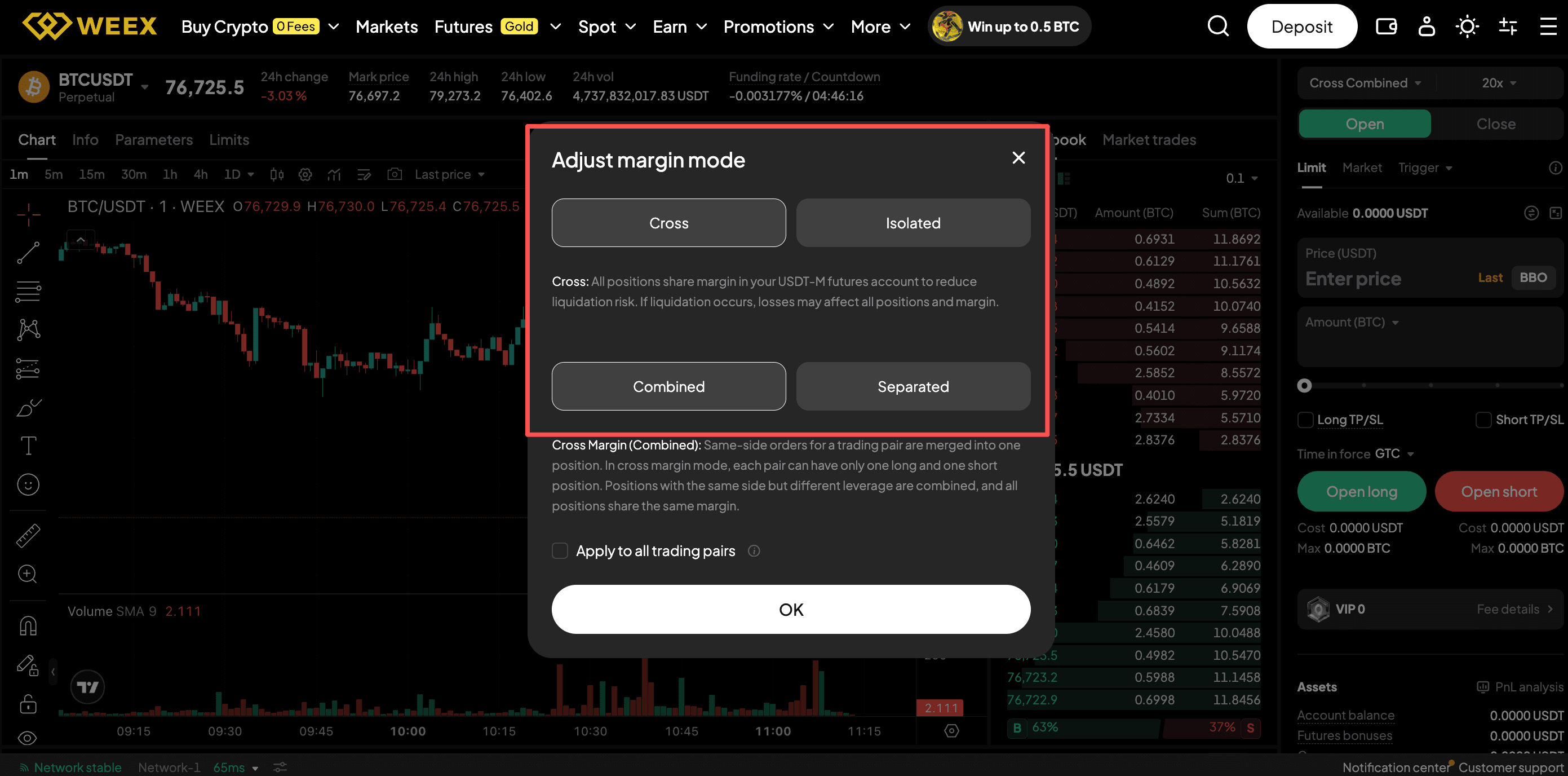
Isolated Margin vs Cross Margin: What's the Difference?
Your leverage setting and margin mode work together. You need to understand both.
Isolated Margin
- Risk is limited to the margin you put into that specific position.
- If the trade gets liquidated, you only lose that position's margin. The rest of your account stays safe.
- Best for: most traders, especially beginners. You know exactly how much you can lose.
Cross Margin (called "Selected" on some platforms)
- Your entire account balance backs all open positions.
- A losing position can use margin from winning positions to stay alive longer.
- But if the total account drops below maintenance margin, everything gets liquidated at once.
- Best for: hedging or advanced traders who know what they're doing.
WEEX advice for beginners: Use Isolated Margin with lower leverage. Know your max loss before you enter the trade.
How to Choose the Right Leverage
There's no "correct" leverage for everyone. It depends on your strategy, risk tolerance, and how much room you want before liquidation.
Ask yourself this: "How much am I willing to lose on this trade?" Not "how much leverage can I get?"
Set your max acceptable loss first. Then adjust leverage so your stop-loss triggers before liquidation. That way you exit on your terms, not the platform's.
Low Leverage (1x–3x)
Gives your position room to breathe. A 2x position needs a 50% move against you to get liquidated.
When to use low leverage:
- Holding positions for hours or days
- Expecting volatility and don't want to get shaken out
- Less certain about timing
- New to derivatives
High Leverage (7x–400x)
Compresses the distance between entry and liquidation. At 100x, a 1% move against you wipes out your margin.
When higher leverage might make sense:
- Well-defined entry with a tight stop-loss
- Actively monitoring the position
- Short-term, high-conviction trade
- Experienced trader
When to avoid high leverage:
- Holding overnight
- Uncertain about timing
- New to trading
- Can't watch the position
WEEX offers up to 400x leverage. That does not mean you should use it. Most professionals trade under 10x.
A Useful Rule of Thumb
Before placing any leveraged order, check the estimated liquidation price in the order panel. If it's closer to current price than you're comfortable with, lower your leverage or add more margin.
Don't guess. The number is right there.
Conlusion
Setting leverage on WEEX is simple. The order panel shows you everything. Leverage slider, liquidation price, margin required.
The hard part is choosing the right leverage for your risk level. Start low. 2x or 3x. Use isolated margin. Set stop-losses. Check liquidation price before every trade.
High leverage is tempting. One good trade and you double your money. One bad trade and you lose everything. The math doesn't care about your feelings.
Ready to trade? WEEX offers zero fees, instant execution, and the security you need. Sign up on WEEX Now and Start Trading!
FAQ
How do I set leverage on WEEX?
On web: open the order panel, find the leverage selector, click it, adjust the slider. On app: tap the leverage value in the order panel, use the slider to adjust. Leverage is set per order.
What is the maximum leverage on WEEX?
WEEX offers up to 400x leverage on some pairs. Most traders should never use that. Start with 2x-10x.
What's the difference between isolated and cross margin on WEEX?
Isolated margin limits risk to one position. Cross margin shares your whole account balance across all positions. For beginners, isolated is safer.
What leverage should a beginner use on WEEX?
Start with 2x or 3x leverage. Use isolated margin. Trade small position sizes. Learn how liquidation works with tiny amounts first.
Is high leverage dangerous?
Yes. High leverage compresses your liquidation price. A 1% move against a 100x position wipes out your margin. Only experienced traders should use high leverage, and only with tight stop-losses.
You may also like

How to Buy Cryptocurrency on WEEX Exchange 2026: Full Guide
Prediction Market Apps 2026: How Prediction Markets Work? Are They Safe and Legal?
Is Polymarket Legal in India in 2026? Key Legal Updates on Prediction Markets
14 Best Prediction Market Apps in 2026: The Ultimate Guide to Crypto-Native and Regulated Platforms
Can Politicians Rig Election Prediction Markets? The Dark Side of Election Prediction Markets
2026 US Election Odds: Who Leads Right Now on Polymarket and Kalshi?
What Is a Crypto Prediction Market? Key Opportunities in the Prediction Market Sector
Plot twist in the AI race—the next big flex is actually physical infra?
How to Profit on Prediction Market: A Beginner's Guide to Prediction Market
Decentralized Prediction Market: A Beginner's Guide for WEEX Users
Kalshi Prediction Market Explained: How It Works and Who Can Use It
What Is WXT Used For? A Beginner's Guide to WEEX Token Utility
Top Prediction Market Websites in 2026: Which Platform Is Best for You?
How to Start Spot Trading on WEEX: No Leverage, No Liquidation Risk
What Is a Prediction Market Platform? How It Works and Key Risks
Can You Make Money on Prediction Markets? Risks and Strategies
Is a Prediction Market Just Gambling? How It Works and Key Risks
What Are the Most Popular Prediction Market Platforms in 2026?
How to Buy Cryptocurrency on WEEX Exchange 2026: Full Guide
Prediction Market Apps 2026: How Prediction Markets Work? Are They Safe and Legal?
Is Polymarket Legal in India in 2026? Key Legal Updates on Prediction Markets
14 Best Prediction Market Apps in 2026: The Ultimate Guide to Crypto-Native and Regulated Platforms
Can Politicians Rig Election Prediction Markets? The Dark Side of Election Prediction Markets
2026 US Election Odds: Who Leads Right Now on Polymarket and Kalshi?
Contents
Popular coins


