
How to Open Futures Positions with Spot Assets on WEEX Exchange 2026: Full Guide for Beginners



You see a futures setup. Your analysis is perfect. But your futures account is dry — and your funds are sitting in spot.
Most traders would stop. Transfer funds manually. Miss the entry.
Not anymore. WEEX now lets you open futures positions directly using spot assets. No manual redemption. No back-and-forth transfers. The system handles it automatically.
If you're into futures trading but hate keeping idle funds in your futures account, this guide is for you.
Let's break down exactly how it works — step by step.
What Is This Feature?
Here's the problem this solves:
You keep most of your funds in spot (to hold). Your futures account has very little. A trading opportunity appears. You need margin — fast.
Normally, you'd:
- Redeem from flexible savings
- Transfer to spot
- Transfer to futures
- Finally open the position
By then, price moved.
With WEEX futures feature:
You select spot as "available" accounts. The system does steps 1-3 automatically. You just place the order.
This is a game changer for active futures trading without keeping large idle balances in your futures account.
Requirements Before Using This Feature
Before you try to open futures positions this way, check these boxes:
- Your spot account or flexible savings account holds available assets (USDT or other supported margin assets)
- On the futures trading page, you manually select those accounts under "Available"
- You are not in multi-asset margin mode (not supported yet)
- You are placing a standard order — not a planned order or trailing stop (those aren't supported yet)
Simple enough. Now let's walk through the actual steps.
Step-by-Step: How to Enable Spot Assets for Futures Trading
Step 1: Go to WEEX Futures Trading Page
Go to WEEX official website and log into your WEEX account. Navigate to the Futures trading interface.
Step 2: Find Funds Section
Look at the order placement area. You'll see a button . This controls which accounts can be used for margin.
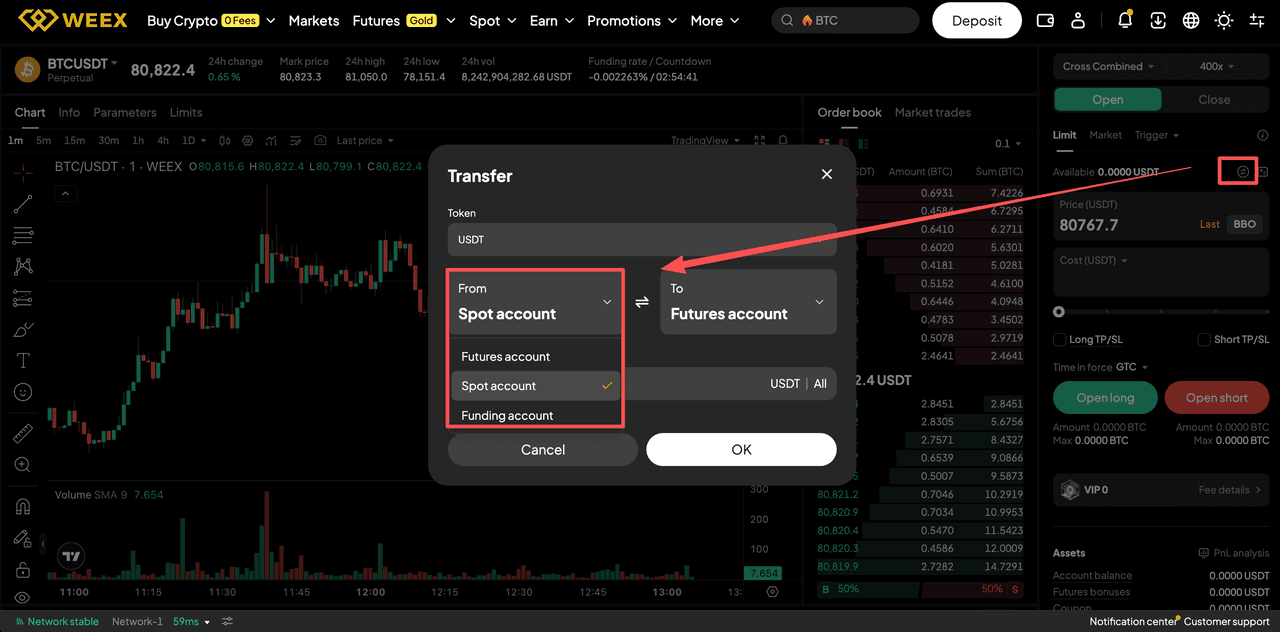
Step 3: Select Accounts You Want to Use
Click Available. You'll see options:
- Futures account (selected by default)
- Spot account
Select one or both of the additional accounts. Your choice.
Step 4: Place Your Futures Order
Enter price and quantity as usual. Submit the order.
What happens next:
If futures balance is enough → system uses futures only.
If futures balance is insufficient → system automatically redeems from flexible savings and/or transfers from spot to cover the gap.
Position opens. You did nothing extra.
Important Notes
Before using this for futures trading on WEEX, understand these limitations:
- Redemption and transfer still take a few seconds. Network conditions apply.
- Can still fail – If flexible savings redemption fails (limits, system issues), your order fails.
- No auto re-staking – Redeemed assets don't go back to flexible savings automatically.
- Liquidation won't touch spot – If you get liquidated, your spot and flexible savings assets are safe. Only futures account is affected.
- Not supported in multi-asset margin mode – Switch modes if you want this feature.
Who Is This Feature For?
This feature makes sense for three types of traders:
- Yield seekers – You keep funds in flexible savings earning interest but still want to trade futures instantly.
- Active futures traders – You hate holding large idle balances in futures account. Pull only when needed.
- Isolated position swing traders – You need to add margin quickly without manual redemption steps.
If you're a passive long-term holder who never trades futures? Ignore this. If you trade actively? Learn it.
Conclusion
Open futures positions on WEEX without manual fund shuffling? Yes. And it works.
The feature is simple: select spot as available accounts. The system does the rest when your futures balance falls short.
It's not for everyone. Multi-asset margin mode and advanced order types aren't supported yet. But for standard futures trading, it saves time and reduces friction.
If you're tired of missing entries because your funds are stuck in savings or spot — enable this today. Test with a small position first. Then scale.
Ready to trade? WEEX offers zero fees, instant execution, and the security you need. Sign up on WEEX Now and Start Trading!
FAQ
What does it mean to open futures positions using spot assets?
It means if your futures account balance is insufficient, WEEX automatically transfers the needed amount from your spot account to cover margin. No manual transfer required.
Does WEEX charge extra fees for using spot or flexible savings as margin?
No. You only pay standard futures trading fees. No extra fee for auto-redemption or auto-transfer.
If I get liquidated, will WEEX take my spot or flexible savings assets?
No. Liquidation only affects your futures account balance. Spot and flexible savings assets are never touched.
Latest Updates on WEEX
If you want to buy WXT now, you can sign up for a WEEX account.
Welcome Bonus from WEEX — Claim Up to 30,000 USDT! Join Now!
You may also like

How to Buy Cryptocurrency on WEEX Exchange 2026: Full Guide
Prediction Market Apps 2026: How Prediction Markets Work? Are They Safe and Legal?
Is Polymarket Legal in India in 2026? Key Legal Updates on Prediction Markets
14 Best Prediction Market Apps in 2026: The Ultimate Guide to Crypto-Native and Regulated Platforms
Can Politicians Rig Election Prediction Markets? The Dark Side of Election Prediction Markets
2026 US Election Odds: Who Leads Right Now on Polymarket and Kalshi?
What Is a Crypto Prediction Market? Key Opportunities in the Prediction Market Sector
Plot twist in the AI race—the next big flex is actually physical infra?
How to Profit on Prediction Market: A Beginner's Guide to Prediction Market
Decentralized Prediction Market: A Beginner's Guide for WEEX Users
Kalshi Prediction Market Explained: How It Works and Who Can Use It
What Is WXT Used For? A Beginner's Guide to WEEX Token Utility
Top Prediction Market Websites in 2026: Which Platform Is Best for You?
How to Start Spot Trading on WEEX: No Leverage, No Liquidation Risk
What Is a Prediction Market Platform? How It Works and Key Risks
Can You Make Money on Prediction Markets? Risks and Strategies
Is a Prediction Market Just Gambling? How It Works and Key Risks
What Are the Most Popular Prediction Market Platforms in 2026?
How to Buy Cryptocurrency on WEEX Exchange 2026: Full Guide
Prediction Market Apps 2026: How Prediction Markets Work? Are They Safe and Legal?
Is Polymarket Legal in India in 2026? Key Legal Updates on Prediction Markets
14 Best Prediction Market Apps in 2026: The Ultimate Guide to Crypto-Native and Regulated Platforms
Can Politicians Rig Election Prediction Markets? The Dark Side of Election Prediction Markets
2026 US Election Odds: Who Leads Right Now on Polymarket and Kalshi?
Contents
Popular coins


