
Popular topics

Popular topics

How to post ads as a regular user
By: WEEX
|
0
The "Post an Ad" feature on WEEX P2P is now available to regular users! This means you have greater control over your trades. Instead of only selecting from existing market ads, now you can set your own price and transaction limits, and post buy or sell ads based on your needs.
Refer to this guide:
I. Posting requirements
To ensure a safe trading environment, you must complete the following steps before posting ads:
- Link your phone number and email address, and complete identity verification.
- Your account must be at least 14 days old.
- Complete at least one P2P order.
- Maintain a P2P order completion rate of ≥ 80% in the past 30 days.
II. How to post an ad
Web
Step 1: Go to the ad posting page
- Visit the WEEX website, find "Buy Crypto" in the top navigation bar, and select "P2P Trading."
- On the P2P homepage, locate "More" in the upper-right corner and select "My Ads."
- Use the "Publish ads" button in the upper-right corner on the "My Ads" page.
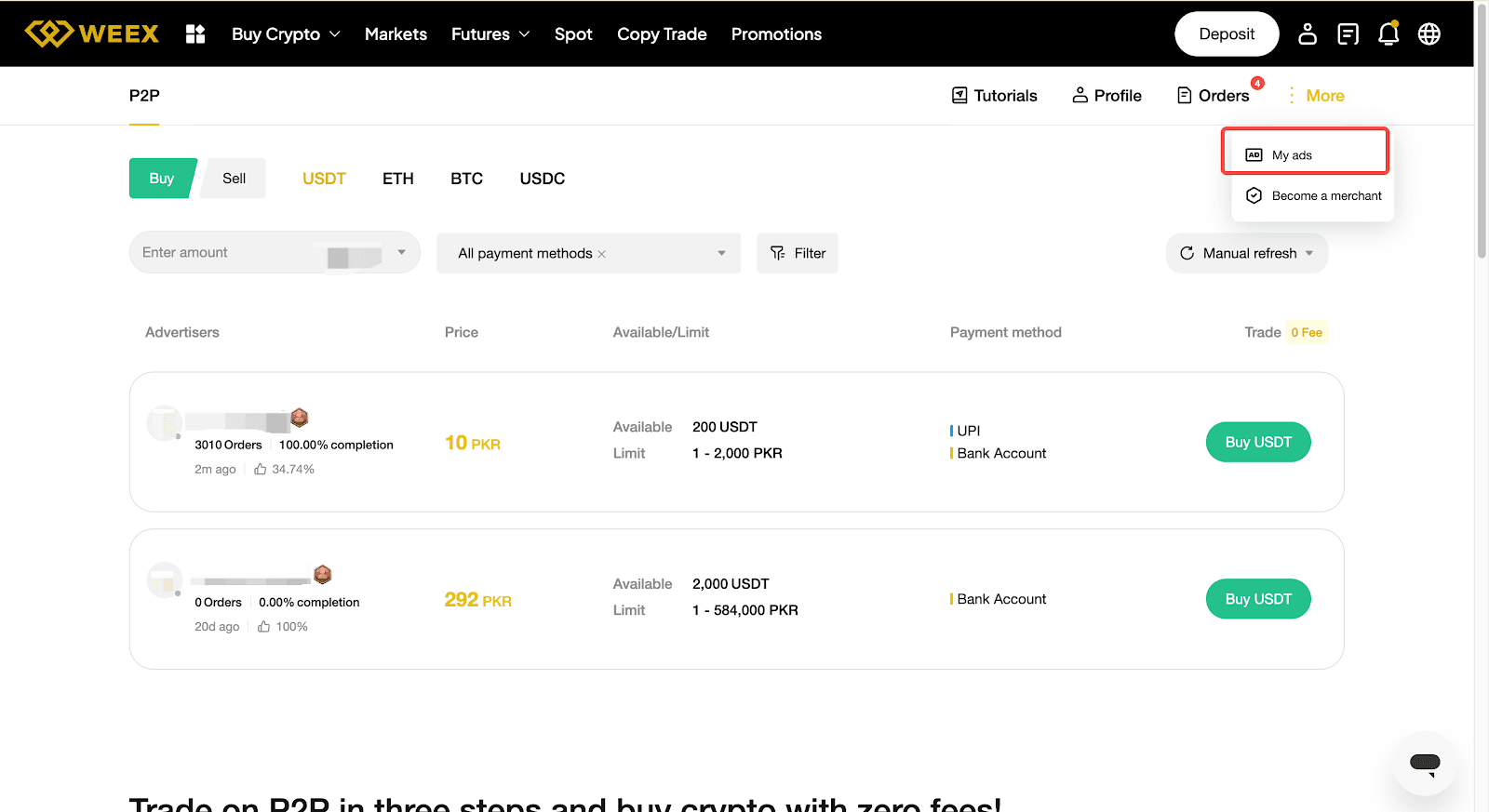

Step 2: Set your ad type and fiat currency
This is an important step, as it determines the direction of your trade.
- Type:
- I want to buy: Use fiat currency to purchase crypto from other users.
- I want to sell: Sell your crypto to receive fiat currency.
- Token & fiat: Select the crypto and fiat currency you want to trade.

Step 3: Set the price and quantity
- Pricing option: Fixed price is supported (the price will not fluctuate with the market, making it more suitable for beginners).
- Ad price: We recommended referring to the current P2P market buy/sell prices and setting a competitive price to increase your chances of faster execution.
- Ad quantity: Enter the total amount of crypto you want to trade.
- Single transaction limit: Set the minimum and maximum amount per order for counterparties (for example: 100 USDT – 5,000 USDT).
- Note: Ads with lower minimum limits typically fill faster, but may result in more small orders.

Step 4: Set your payment method, remarks, and trading requirements
- Payment method: Select the payment methods you prefer. If you're buying, make sure you can complete payment using the selected methods. If you're selling, buyers will transfer funds to you through these methods.
- Payment window: Set the order payment time (typically 15 – 30 minutes).
- Automated reply and advertiser terms:
- Specify your trading requirements here, for example: The payer name must match the verified name on your WEEX account. Third-party payments are not accepted. Otherwise the crypto won't be released.
- Clear terms can help reduce disputes.
- Trading requirements: You may enable and configure specific trading restrictions. Only users who meet these requirements will be able to trade with you.


Step 5: Review and publish
- Double-check the price, quantity, order limits, and payment methods.
- Use the "Submit Post" button to publish your ad, then enter the verification code to confirm.
- Now your ad should be published! It will appear in the P2P marketplace shortly.

III: Ad management
Once published, you can view and manage your ads under "My Ads":
- Offline/offline: If you're temporarily unable to handle orders, be sure to take your ad offline to avoid missed orders, negative ratings, or potential disputes.
- Edit: You can update the price and remaining quantity at any time.
- Share: Generate a poster to share your ad on social media and get more exposure.

IV: Risk control and safety precautions
As an ad poster, you will be trading directly with counterparties. Make sure to follow these safety rules:
- Verify the payer's identity:
- When selling crypto and receiving funds, make sure the payer's account name exactly matches the verified name on their WEEX account.
- If the names do not match: Immediately request a refund through the chat and refuse to release the crypto. Your bank account may be frozen if you receive third-party payments.
- Confirm receipt of funds:
- Before releasing crypto, do not rely on transfer screenshots or SMS notifications. Log in to your receiving account and confirm the funds have been credited before releasing the crypto.
- Keep communication on-platform: All communication must take place in the official WEEX P2P chat. Don't use other messaging apps. Off-platform chat history cannot be used as evidence in the event of a dispute.
- Avoid sensitive keywords: Don't include terms such as "USDT," "Bitcoin," or "cryptocurrency" in payment notes, as this may trigger bank risk controls.
FAQ
Q1: Is there a fee for posting an ad?
A1: Currently, regular users can post ads with zero fees.
Q2: Is a security deposit required?
A2: Regular users are not required to make a security deposit to post ads. However, your account must meet the minimum asset balance requirement to ensure you have sufficient funds to fulfill your orders.
Q3: Why can't others see my ad?
A3: First, check whether your ad is set to "Online." If it is, a price that's far from the market rate may push your ad lower in the marketplace rankings.
Q4: What limits apply to regular users posting ads?
A4: The following limits apply:
Limit type |
Limit |
No. of buy ads |
2 ads |
No. of sell ads |
2 ads |
Maximum amount per ad |
$10,000 |
Total open orders |
10 orders |
Q5: Why can't I post an ad?
A5: You may be unable to post an ad for the following reasons:
- You do not meet the eligibility requirements for regular users described above.
- Your verified nationality is not supported for P2P trading.
- Your account is currently subject to risk control restrictions.
- You recently completed your first P2P order. Wait approximately 3 minutes before posting your first ad.
Related articles
Share
Gainers


Customer Support:@weikecs
Business Cooperation:@weikecs
Quant Trading & MM:bd@weex.com
VIP Program:support@weex.com
